 1bef54163c
* add HTML interface (inlined into typescript) - with CSS and autocomplete hand-holding

* Some changes (listed below)

- Make UI optional and disabled by default
- Lint it in line with other code
- Import UI from a bundled HTML file
- Add UI to README
- Add support for random URL generation
- Show the URL in the output

---------

Co-authored-by: Erisa A <erisa@erisa.uk>
149 lines
5.2 KiB
Markdown
149 lines
5.2 KiB
Markdown
# Worker Links (URL Shortener)
|
|
|
|
A simple URL Shortener for Cloudflare Workers, using Workers KV. Redirect short URLs at the edge of the Cloudflare network to keep latency down and access fast!
|
|
|
|
I run this code in production on [erisa.link](https://erisa.link/example), though the root name redirects and without the secret it doesn't make a very good demo.
|
|
|
|
It was made for my personal use but is available publicly in the hopes that it may be useful to someone somewhere.
|
|
|
|
## Deploy (simple)
|
|
|
|
Wrangler 2 is required now, but should be handled automatically for `yarn` commands.
|
|
To run manual wrangler commands, try `npx wrangler`.
|
|
|
|
Simple steps:
|
|
|
|
- `yarn install`
|
|
- `yarn addsecret`
|
|
- `yarn deploy`
|
|
|
|
## Deploy (More involved)
|
|
|
|
To deploy to your Cloudflare Workers account, edit the relevant entries in `wrangler.toml`, add a secret with `wrangler secret put WORKERLINKS_SECRET` and use `wrangler publish`.
|
|
|
|
## Debugging
|
|
|
|
For debuggging, you can use `yarn dev` (Which runs `wrangler dev --local`). To change the secret used in this mode, edit the `.dev.vars` file.
|
|
|
|
You can also debug on the edge with `wrangler dev`, though you will need to first configure a prepview namespace in `wrangler.toml` and add the `WORKERLINKS_SECRET` secret to the Worker.
|
|
|
|
## (Optional) User Interface
|
|
|
|
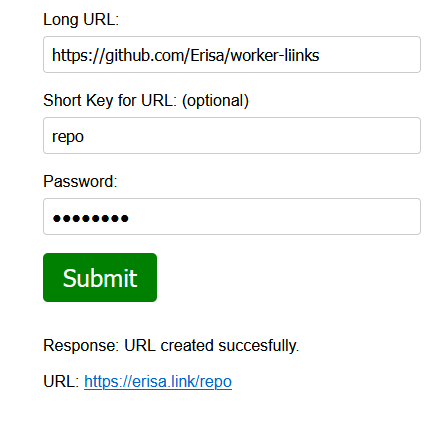
If `ENABLE_INDEX_FORM` is enabled in `wrangler.toml`, an optional UI form is available when visiting the Worker in a browser, allowing easy creation of links:
|
|
|
|
|
|
|
|
## Usage
|
|
|
|
Once deployed, interacting with the API should be rather simple. It's based on headers, specifically with the `Authorization` and `URL` headers.
|
|
|
|
To create a short URL with a random URL, send a `POST` to `/` with `Authorization` and `URL` headers:
|
|
|
|
```json
|
|
erisa@Tuturu:~$ curl -X POST -H "Authorization: mysecret" -H "URL: https://erisa.uk" https://erisa.link/
|
|
{
|
|
"message": "URL created succesfully.",
|
|
"key": "q2w083eq",
|
|
"shorturl": "https://erisa.link/q2w083eq",
|
|
"longurl": "https://erisa.uk"
|
|
}
|
|
```
|
|
|
|
And you can test it worked if you wish:
|
|
|
|
```http
|
|
erisa@Tuturu:~$ curl https://erisa.link/q2w083eq -D-
|
|
HTTP/2 302
|
|
date: Fri, 11 Sep 2020 12:43:04 GMT
|
|
content-length: 0
|
|
location: https://erisa.uk
|
|
server: cloudflare
|
|
..other ephemeral headers..
|
|
```
|
|
|
|
To create or update a custom short URL, send a `PUT` to the intended target URL:
|
|
|
|
```json
|
|
erisa@Tuturu:~$ curl -X PUT -H "Authorization: mysecret" -H "URL: https://erisa.uk" https://erisa.link/mywebsite
|
|
{
|
|
"message": "URL created succesfully.",
|
|
"key": "mywebsite",
|
|
"shorturl": "https://erisa.link/mywebsite",
|
|
"longurl": "https://erisa.uk"
|
|
}
|
|
```
|
|
|
|
And to delete an existing shortlink, send a `DELETE` to it with only the `Authorization` header:
|
|
|
|
```json
|
|
erisa@Tuturu:~$ curl -X DELETE -H "Authorization: mysecret" https://erisa.link/keytodelete
|
|
{
|
|
"message": "Short URL deleted succesfully.",
|
|
"key": "keytodelete",
|
|
"shorturl": "https://erisa.link/keytodelete",
|
|
"longurl": "https://erisa.uk"
|
|
}
|
|
```
|
|
|
|
You can also bulk create multiple shortlinks at once by sending a `POST` to `/` with no `URL` header and with a JSON body instead:
|
|
|
|
```json
|
|
erisa@Tuturu:~$ curl -X POST -H "Authorization: mysecret" https://erisa.link/ \
|
|
-H 'Content-Type: application/json' \
|
|
-d '{ "/short1": "https://example.com", "/mywebsite": "https://erisa.uk" }'
|
|
{
|
|
"message": "URLs created successfully",
|
|
"entries": [
|
|
{
|
|
"key": "short1",
|
|
"shorturl": "https://erisa.link/short1",
|
|
"longurl": "https://example.com"
|
|
},
|
|
{
|
|
"key": "mywebsite",
|
|
"shorturl": "http://erisa.link/mywebsite",
|
|
"longurl": "https://erisa.uk"
|
|
}
|
|
]
|
|
}
|
|
```
|
|
|
|
You can list all URLs by sending a `GET` to `/` (with the `Authorization` header set to your secret, of course).
|
|
|
|
```json
|
|
kot@Starry:~$ curl -H "Authorization: mysecret" "https://erisa.link/?prefix=%2F&limit=1"
|
|
{
|
|
"list_complete": false,
|
|
"cursor": "AAAAAJhOXekucRAqut7Xs7Q2f09GCZyStWBfONvq6u5JP05Bg-z5FM5gf7krRaDrsvyxqfDuvFWUHIZp2n9OZ7Au92h-x68xwg8-bwerIoPd7fesG5w-ZB6f6oXopZHNXDCscmVUQ0OIaDEOx_6pruyEcCKfD3WpOstj6lO_sYJG_zQKdBgmYvLoMFQpK-cK7t8mCLWQA2t351xc9sJ08SM0JniY73t7bOdSxF3ADVTV6ihMSti0Z6svhpknfCn9VHjT",
|
|
"links": [
|
|
{
|
|
"key": "/0031qr7q7"
|
|
},
|
|
{
|
|
"key": "/00ybqita"
|
|
},
|
|
{
|
|
"key": "/02ji9wlg"
|
|
}
|
|
]
|
|
}
|
|
```
|
|
|
|
The endpoint is paginated by default (1000/page). Just send `cursor` in the query string to access the next page.
|
|
|
|
You can set `limit` in the query string to `0` to retrieve all URLs.
|
|
|
|
You can also view URLs from your Cloudflare Dashboard:
|
|
`Cloudflare Dashboard -> Workers -> KV -> View` on the namespace.
|
|
|
|
## Plausible Analytics
|
|
|
|
To get statistics for your short URLs with Plausible Analytics, define a `PLAUSIBLE_HOST` secret set to the URL of your Plausible instance. For example, `https://plausible.io/`.
|
|
|
|
## Security
|
|
|
|
This code is relatively simple but still, if you find any security issues that can be exploited publicly, please reach out to me via email: `erisa (at) erisa.uk` with any relevant details.
|
|
|
|
If you don't have access to Workers KV you're welcome to test these issues on my live `erisa.link`, provided you don't send excessive (constant) requests or delete/modify any keys except ones created by you or the `/sample` key.
|
|
|
|
If I don't respond to your email for whatever reason please feel free to publicly open an issue.
|